By Clipback
A first cut can be well edited and still miss the assignment. The editor builds an energetic montage; the client wanted a calm explanation. A vertical crop arrives when the website needs a landscape video. The booking message turns up after the music, pacing, and ending have already been chosen.
A video editing brief gives the editor the decisions they need before cutting: who the video is for, what it should achieve, what must appear, which footage and assets are available, and what files need to be delivered. It also names the people who will review the work and return the final decision.
If you edit for clients, send the template below before starting a new project. Fill it in together, flag the gaps, and use the agreed brief to guide the first review. You do not need a long presentation to make the next editing decision clear.
Download the free video editing brief template → A plain-text file you can copy into an email or shared document. No signup required.
What should a video editing brief include?
A useful brief answers three practical questions: what should the viewer understand or do, what material can the editor work with, and how will the team decide that the cut is ready?
- Audience and purpose: the intended viewer, where they will watch, and the action or idea the video should leave them with.
- Message and creative direction: the main point, tone, useful references, and choices to avoid.
- Deliverables: duration, aspect ratio, resolution, language, captions, and any separate versions.
- Available material: footage, selects, script, logos, approved wording, music, and anything still missing.
- Review and delivery: the first-cut deadline, reviewers, decision-maker, feedback deadline, and agreed revision scope.
Write “to be confirmed” beside an unanswered question and name who will answer it. An empty field can look like permission to choose; a visible dependency gives you something concrete to resolve.
Start with the viewer's next step
“A video for our business” leaves most of the assignment open. “Help local commuters understand that we service everyday bicycles, then direct them to book a service” gives the editor a way to judge shots and pacing.
Choose one main outcome for this cut. A short service promo might lead to a booking page. A product demonstration might explain one feature. An internal training video might help someone complete a task. Name the outcome before deciding how many messages can fit.
Then identify the viewing context. A website visitor who has already opened the service page may need different context from someone seeing a short clip in a social feed. If you need both placements, list both deliverables and agree the work involved.
Turn creative adjectives into editing choices
Words such as “premium,” “dynamic,” and “authentic” can start a conversation, but they do not settle the edit. Ask what the client expects to see or hear.
For a fictional bicycle-workshop video, “careful and approachable” could mean keeping the mechanic's hands and wheel visible, using readable on-screen wording, and avoiding rapid cuts that make the work hard to follow. A racing montage with aggressive transitions would send a different message.
When the client sends a reference, ask them to identify the part that matters: “the measured pace between 00:05 and 00:12,” “the size of the captions,” or “the quiet music under the explanation.” Also record what you should avoid copying. A reference is more useful when the team agrees which choice it illustrates.
List the actual exports and missing assets
Write down each required version. “One 16:9 website video, 1920 × 1080, 12–15 seconds including the end card” is a deliverable the editor can plan around. If a 9:16 social version is also needed, add it explicitly and confirm its framing and text placement separately.
Identify captions, languages, and audio expectations too. If the video needs to make sense with the sound off, decide how the key message will be communicated. Confirm where exact wording, names, claims, logos, music, and other approved assets will come from.
Share an accessible footage folder and say whether it contains everything available or only an initial selection. Note preferred takes and footage that must not be used. Ask the client to confirm any permissions or usage restrictions that affect the supplied material.
Keep dependencies specific: “Jamie will confirm the booking URL before the delivery export” is useful. “CTA later” leaves the editor guessing whether the ending is ready to build.
A video editing brief template you can copy
Replace the brackets. If an item does not apply, say so. Keep the agreed version of this brief beside the review notes.
VIDEO EDITING BRIEF

Project / client:
Brief version / date:
Client contact:

1. PURPOSE
Who is the intended viewer?
Where will they watch this video?
What is the one main message?
What should they understand or do next?

2. DELIVERABLES
Required cuts / placements:
Duration of each cut, including any end card:
Aspect ratio / resolution / file format:
Language / captions / on-screen text:
Audio expectations, including sound-off viewing:

3. CREATIVE DIRECTION
Tone, described as concrete choices:
References, with timestamps and what to take from each:
Things to avoid:

4. MATERIALS AND MUST-HAVES
Footage folder / selects / script:
Required shots or moments:
Approved wording / CTA / destination URL:
Logo / graphics / music / other assets:
Usage restrictions or material excluded from this cut:
Missing items, owner, and confirmation deadline:

5. REVIEW AND DELIVERY
First-cut deadline [date, time, time zone]:
What the first review should decide:
Reviewers:
Person who consolidates feedback:
Person who resolves conflicts and gives final approval:
Feedback deadline [date, time, time zone]:
Agreed revision scope / rounds:
How additional requests will be agreed:
Delivery deadline / handoff location:

6. CONFIRMATION
Open questions and their effect on the next step:
Agreed by / date:
Location of the current agreed brief:
A filled-in example: a bicycle-workshop promo
Here is a fictional brief for a short service video. It uses freely available demonstration footage of bicycle-wheel maintenance. The footage is not a recording of the fictional client's premises, and the example is not a customer result.
| Brief item | Agreed direction |
|---|---|
| Audience and placement | Local commuters visiting the cycle shop's service page. |
| Purpose | Show careful workshop service and direct viewers to book a bike service. |
| Deliverable | One 16:9, 1920 × 1080 website cut, 12–15 seconds including the end card. No social adaptation in this brief. |
| Creative direction | Calm and practical. Keep the wheel and gloved hands readable. Avoid racing imagery and rapid transition effects. |
| Must-haves | A clear view of the work and the approved end-card wording: “Book a bike service.” The message must work with sound off. |
| Available material | One roughly 14-second workshop excerpt for the demonstration. The first review uses that footage before the end card is added. |
| Open dependency | Jamie, the fictional client contact, must confirm the booking URL before the delivery export. |
| Review focus | Confirm framing and pacing, then check the end-card plan. Jamie consolidates the notes and gives the final decision. |
This brief lets the editor distinguish an adjustment from a new assignment. Moving to a fast-paced cycling-action concept would change the agreed direction. A new vertical version would add a deliverable. Either may be worthwhile; identify the change and agree its effect on scope and timing before editing it.
Use the brief when the first cut is ready
Send the review link with the brief's decisions in mind. Say what is ready to judge and what is still unfinished. For the workshop example, the invitation could read:
Please review version 1 for framing and pace against the agreed workshop brief. The end card is still to be added. Keep the wheel and hands clear, and flag any moment that feels rushed. Please confirm the booking URL before we prepare the delivery export.
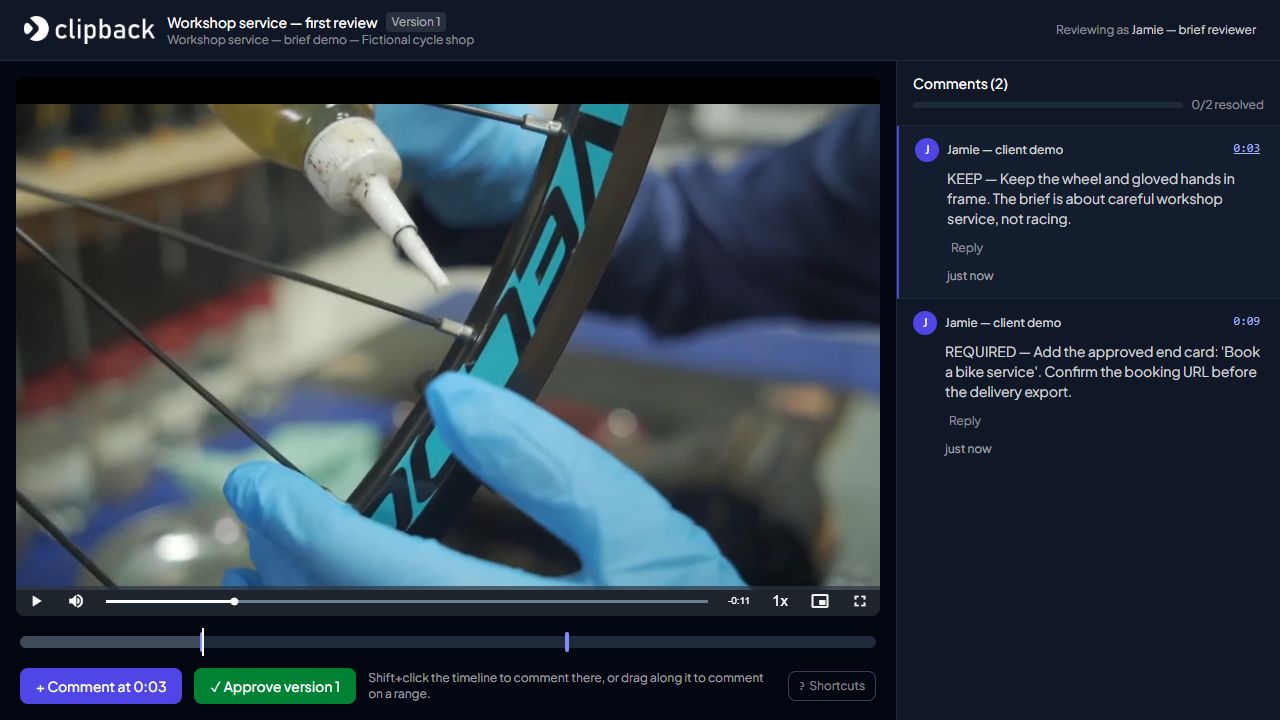
In the actual Clipback demonstration below, the submitted notes connect the review to the brief. The 00:03 Keep note protects the workshop framing. The 00:09 request identifies the end card and the outstanding booking URL. The screenshot shows a review in progress; those requests have not been implemented or approved.
For the mechanics of sending the link, use our guide to client video review without a reviewer account. For clearer individual notes, share the client video feedback template.
Update the brief when the direction changes
A brief gives the team a shared starting point. When the client changes a message, audience, or deliverable, record the new instruction, who agreed it, and what it means for the cut. Keep earlier feedback identified with the video version it refers to.
If reviewers want different directions, use a named decision-maker and a clear question. Our guide to conflicting stakeholder feedback covers that conversation. Once the agreed work is complete, ask for approval of the identified version.
Give your next edit a clear starting point. Download the brief, fill it in with the client, and keep the open questions visible. When the first cut is ready, start a free Clipback project and collect feedback against the direction you agreed.
The cycle-shop project, brief, and reviewer identities are fictional. The screenshot was freshly captured from the actual Clipback app on 29 October 2026 using a Studio demo account. Demonstration footage: Bicycle Wheel Repair in Workshop Setting by Ashish Jatiani / Pexels, used under the Pexels License. No creator or workshop endorsement is implied.